Imagine this scenario: A potential customer drops their phone on a concrete driveway, shattering the screen completely. They need it fixed immediately. They don’t open a desktop computer, build a complex query, or read a 3,000-word blog post.
Instead, they pull out a backup device, open Google Maps, and frantically type: “Phone repair near me.”
Google instantly displays the top three local business recommendations right at the peak of the search results—the coveted Google Map Pack. The customer glances at the first business, sees a perfect 4.9-star rating, notices they are open right now, and clicks the bright blue “Call” button. Within 15 seconds, a local transaction is secured.
Meanwhile, your local storefront or your client’s business is sitting quietly down the street. You have a beautiful website and great service, but your profile is nowhere to be found on that map layout.
Naturally, frustration sets in. You start wondering, “Why is Google hiding my business from local customers? Do I need to spend thousands on paid map ads to show up here? How are my competitors drowning in daily phone inquiries while my phone remains completely silent?”
First of all, take a deep breath. At Anus Khan Insights, we want to reassure you that dominating local search isn’t a game reserved exclusively for massive corporate franchises with unlimited marketing budgets. It does not mean you have to buy your way onto the map pack. It simply means your Google Business Profile (GBP) lacks the technical optimization layers and authority signals that Google’s local algorithm looks for.
In this comprehensive, step-by-step masterclass, we will pull back the curtain on Google’s local proximity and relevance mechanics. We will analyze the essential ranking factors behind a flawless setup and show you the exact free methods to optimize your profile to capture dominant local search traffic.
Let’s claim your top map position together!
The Golden Rule: Understanding Proximity, Relevance, and Prominence
Before you fill out a single form field on the Google dashboard, you must understand the underlying engine that powers local algorithm updates. Unlike standard organic search, which focuses heavily on traditional backlinks and text depth, the local map pack runs on three strict pillars.
To understand this effortlessly, let’s bring back our favorite Billboard Analogy.
Think of a standard website as a massive digital billboard floating out in space. It can be seen by anyone, anywhere, at any time, provided they have the exact coordinates.
Conversely, think of your Google Business Profile as a physical neon arrow sign bolted directly onto a brick-and-mortar street corner.
Proximity: Is your neon arrow physically close to where the user is standing when they search?
Relevance: Does the wording on your sign match exactly what the user is looking to buy right now?
Prominence: Do the people in the neighborhood talk about your store, leave positive reviews, and recommend it to newcomers?
If your profile is incomplete, hidden, or contains conflicting information, your neon arrow is effectively turned off. Your primary goal as a professional digital strategist is to feed Google’s algorithm with absolute clarity across all three pillars, so it confidently displays your sign to every local searcher.
5 Steps to Set Up a Flawless Local Profile
If your business isn’t generating direct phone calls, navigation requests, or website clicks from Google Maps, implement this baseline architectural setup immediately:
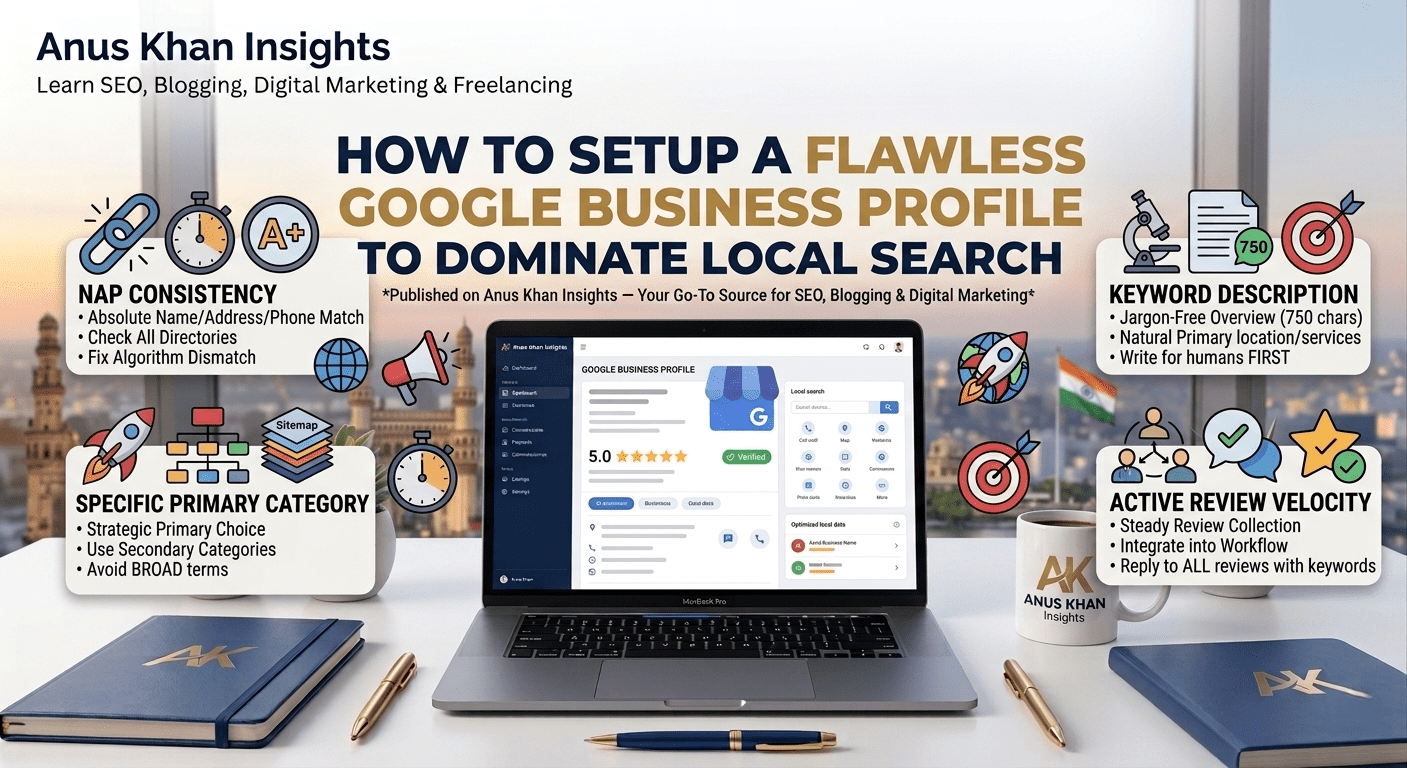
1. Maintain Absolute NAP Consistency
NAP stands for Name, Address, and Phone Number. This is the absolute foundation of local SEO authority. Google’s bots crawl thousands of online directories (like Yelp, YellowPages, and local chamber websites) to verify that your business is legitimate.
The Guardrail: The way your business name and address are spelled on your Google profile must match your website footer and your official legal registration exactly. If your website says “123 Main Street, Suite B” but your profile says “123 Main St. #B”, the algorithm perceives a data mismatch, lowering your prominence score.
2. Select Your Primary Category Strategically
Your Primary Category accounts for the single largest weight in local relevance rankings. Many businesses make the mistake of choosing a broad, generic primary category or stacking too many unrelated sub-categories.
The Tactic: If you are a personal injury attorney, do not set your primary category to a general “Lawyer”. Set it strictly to “Personal Injury Attorney”. Use your secondary categories to capture related operations like “Trial Attorney” or “Legal Services”.
3. Build a Keyword-Optimized, Jargon-Free Description
Google provides 750 characters for your business description asset. Do not waste this space by writing poetic company mission statements or stuffing a raw list of keywords.
The Framework: Write a clean, human-first overview that naturally includes your primary target location and main services within the first 150 characters.
Example: “Anus Khan Marketing Agency provides premium SEO optimization, local lead generation, and social media management for small businesses in downtown Hyderabad…”
4. Implement High-Resolution Geo-Tagged Images
Profiles containing fresh, high-resolution visual imagery receive significantly more driving direction requests than profiles with static stock photos.
The Action Blueprint: Upload real photos of your office interior, your exterior storefront signage, and your team in action. Avoid heavily filtered or AI-generated lookalikes. Uploading images directly from mobile devices with active location metadata (GPS tagging) signals to Google that your business is highly active at that exact physical location.
5. Execute an Active Review Velocity Strategy
Reviews are the lifeblood of local prominence. However, getting 50 reviews in one single weekend and then receiving zero feedback for the next six months triggers a manipulative spam signal within the dashboard.
The Rules: Build a consistent “Review Velocity.” Create a short, clean Google review shortcut link and embed it into your automated client offboarding workflows, post-purchase emails, or physical invoice cards. Always reply to every single review—both positive and negative—by naturally weaving in your core service keywords within your public response template.
Local Profile Diagnostic & Suspension Quick-Reference Table
| Dashboard Notification / Issue | What It Truly Means | How to Fix It Fast |
| “Your profile has been suspended” | Google detected suspicious edits, an invalid residential address, or a strict violation of guidelines. | Do not create a new profile. Audit your NAP data against your official business license and submit a formal reinstatement request. |
| “Changes are pending review” | The algorithm is cross-referencing your recent business updates with external web directory signals. | Wait 48 to 72 hours. Avoid making additional rapid edits to your dashboard while the verification check is processing. |
| Profile matches a “Duplicate Listing” | Another user or an old employee previously claimed a profile for your exact storefront location. | Click the “Request Access” button inside the dashboard. Follow the prompts to prove ownership and merge the listings. |
| Ranking dips despite great reviews | Local competitors are optimizing their profiles for real-time user engagement and localized search intent. | Turn on the Google Business Messages feature; post weekly native updates or local product offers directly to your profile feed. |
Final Thoughts
At the end of the day, turning your local business listing into a dominant lead-generation engine isn’t about manipulating the map system—it’s about building absolute clarity and consumer trust. By executing a clean setup, verifying your data points, and maintaining a steady stream of authentic client feedback, you lock in long-term organic authority.
Let’s do a quick recap of our diagnostic action plan:
Local search visibility relies on three pillars: Proximity, Relevance, and Prominence.
Keep your Name, Address, and Phone number 100% consistent across every single page of the internet.
Maximize search relevance by selecting highly specific primary business categories.
Keep your profile fresh by regularly uploading authentic, real-world team and office photos.
Maintain a steady review collection process to establish continuous authority signals for the algorithm.
At Anus Khan Insights, we are dedicated to simplifying the technical side of web growth. Set up your parameters correctly, audit your local framework steps systematically, and watch your business inbound phone calls scale!
Written by Muhammad Anus Khan — Digital Strategist, SEO Expert & Founder of Anus Khan Insights
Category: Local SEO & Growth | Reading Time: 8 Minutes | Level: Beginner
Next Read: How to Run High-ROI Meta Ad Campaigns for Local Service Businesses — Coming Tomorrow on Anus Khan Insights!
Leave a Reply